

Online Safety
Technology is at the very centre of all our lives today – especially our children’s. Learning how to use technology wisely is an essential skill for life and learning in the 21st century. However, at a time when there is increased access to numerous different technology platforms, many children are at a greater risk of online grooming, cyber bullying and exposure to inappropriate or illegal content online. Martin Bacon Academy believe that both school and parents/carers need to work in partnership in order to safeguard children from harm online.
Martin Bacon Academy believe that promoting online safety plays a critical role in protecting our pupils online and as a result pupils are taught about how to stay safe and how to behaviour appropriately online. Martin Bacon Academy/Meridian Trust have extensive security measures in place which keep children safe whilst using technology in school and their usage is monitored to help safeguard them from potential dangers or unsuitable materials.
Parents/carers have a highly important role to play in keeping children safe online. There are many ways parents/carers can help minimise the risks associated with children being online and increase parents/carers awareness of online safety. The list below provides ideas to help parents/carers keep children safe online:
Age Appropriate
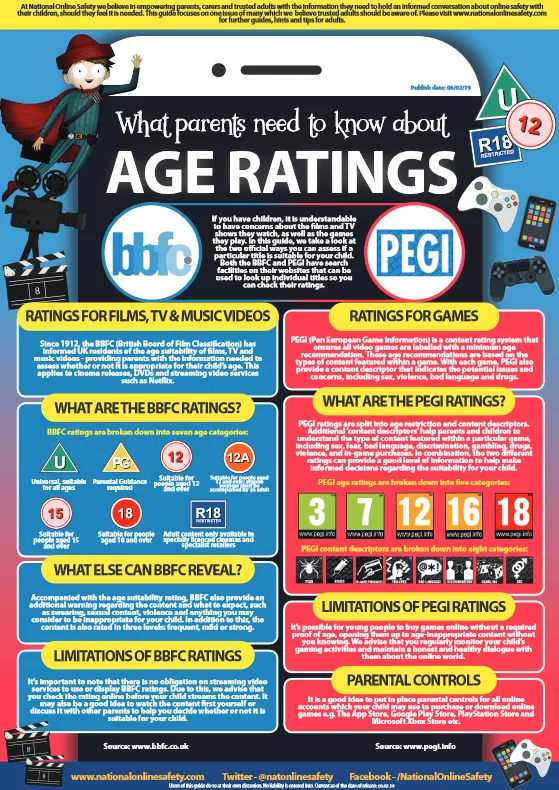
Only give your child access to devices, websites, apps, games and social media sites that are age appropriate. Access the PEGI guidance (https://pegi.info/page/pegi-age-ratings) on age ratings to inform your choices when buying games for your child, or deciding whether the games they are playing are appropriate, by following the age-ratings assigned to each game. Read each game’s advice for parents and play the game yourself to help you understand what it involves.
Common Sense Media Common offer a trusted library of independent age-based and educational ratings and reviews for movies, games, apps, TV shows, websites, books and music which can be found using the following link https://www.commonsensemedia.org/.
Below is a poster produced by National Online Safety which offers information on age ratings.
Appropriate Content
Only give your child access to devices, websites, apps, games and social media sites that you feel comfortable with and not as a result of peer-pressure.
Below are a selection of posters produced by National Online Safety which offer information on some of the current and popular websites, games, apps and social media sites that children are asking their parents/carers if they can access. These posters offer parents/carers the information they need to make an informed decision on whether it is in their child’s best interests to access this material.
Communication
Talk to your child about why it is important to stay safe online. Explain that whilst the internet is a fun, exciting and knowledge-rich tool, it is also a place where people may wish to bring them into dangerous activities or expose them to unpleasant material. It is important to be clear that you are not saying your child may never use the internet again, or that everything on it is harmful – it is about teaching them to have a greater awareness and to be able to manage and report any risks. Keep an open dialogue with your child – letting them know they can always talk to you about anything that has made them feel uncomfortable online is key to keeping them safe.
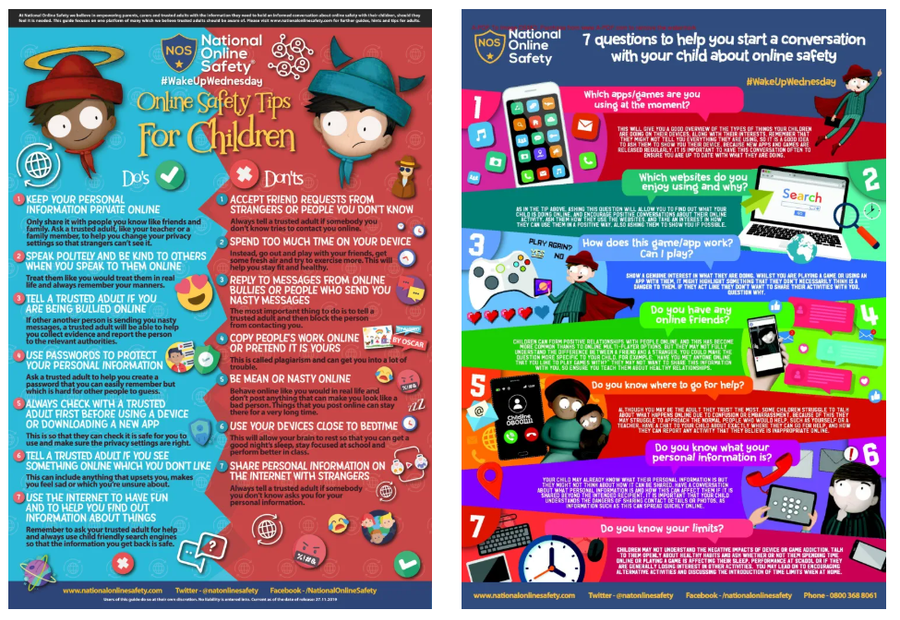
Below is a child friendly poster produced by National Online Safety which helps to give advice to children about online safety and advice to parents/carers on how to talk to children about online safety.
Rules and Boundaries
Discuss with your child rules for being online and draw them up together, including which websites, games, apps, social media sites etc., are acceptable. If certain materials are off-limits, try to explain why, for example, because of excessive violence or bad language. If your child uses online gaming, consider setting rules, such as only talking to people you know and having the conversations on speaker, rather than through headphones, so you can monitor it.
Information Sharing
Talk to your child about what information should be kept private; for example, name(s), date of birth, address, contact details, school name etc., should never be given out to strangers online. Remind your child not to give out their passwords and ensure they change it occasionally. Teach them to unclick the ‘remember me’ option on public computers such as at school and the library.
Supervision, Monitoring and Parental Controls
Ensure all devices used by your child are kept in a communal space, or a space where they can be supervised whilst using their devices. You can check what your child has been doing by looking at the history in your internet browser, Set parental controls which are designed to help parents/carers manage their child’s online activities. However, do not rely on parental controls on devices over you offering support and advice to your child online, as they are not always 100% effective and some children know how to bypass them. The use of ‘SafeSearch’ is highly recommended for use with children. Most web search engines will have a ‘SafeSearch’ function, which will allow you to limit the content your child is exposed to whilst online. Look out for the ‘Settings’ button on your web browser homepage (often shaped like a small cog).
Devices
At MBA we ask learners who bring devices to school to hand them in when they arrive.
At home, you may want to set parental controls on your young person’s phone or tablet. There are some resources to support you below. If you need help with any of these, please contact school and we will be happy to help you.
- Apple: how to enable parental controls on an iPhone and iPad
- Microsoft: how to enable parental controls on Windows and XBOX
- Android: how to enable parental controls on Android phones and the Google Play Store
For further information on setting up parental control see the following link:
https://www.thinkuknow.co.uk/parents/articles/Parental-controls/
For further information on how to set up parental controls on different devices see the following link:
https://www.internetmatters.org/parental-control
Social Media
Privacy
In our Internet acceptable use policy, we ask all learners to set their profiles to “protected”, “locked” or “friends only” and set up maximum privacy. To help your young person do this on the sites they use, follow the links below. Be aware that the minimum age for all of these sites is 13.
- Snapchat
- YouTube
- X/Twitter (be aware X/Twitter policies and features have recently been changing rapidly and at short notice – if your young person has a Twitter account, be sure to revisit privacy settings regularly)
Reporting and Blocking
Make sure your child knows how to report or ‘block’ unsuitable content, messages or people online – show them how to block on the websites or games they frequently use and explain that they can always tell you, a teacher or another adult if they experience anything which makes them feel uncomfortable. If a parent/carers is worried about online sexual abuse or the way someone has been communicating with a child on line a report should be made to the Child Exploitation and Online Protection (CEOP) team. CEOP is a command of the National Crime Agency and can investigate what is happening – with the assurance that the safety and wellbeing of children is paramount at all times.
To make a referral to CEOP see the following link:
https://www.ceop.police.uk/safety-centre/
Resources for Parents/Carers and Children
Resources for children aged 4-7 year olds
Jessie & Friends is a safe and age appropriate resource for children aged between 4-7 years old. The Jessie & Friends animations are age-appropriate. The video clips and story books show safe, non-scary situations which help young viewers identify things which might worry them online.
Episode 1 – Watching Videos (4-5 years)
Video Clip:
https://www.thinkuknow.co.uk/parents/jessie-and-friends-videos/
Worksheet:
https://www.thinkuknow.co.uk/globalassets/thinkuknow/documents/thinkuknow/parents/pdf/thinkuknow-4-5s-home-activity-sheet-1.pdf
https://www.thinkuknow.co.uk/globalassets/thinkuknow/documents/thinkuknow/parents/pdf/thinkuknow-4-5s-home-activity-sheet-2.pdf
Episode 2 – Sharing Pictures (5-6 years)
Video Clip:
https://www.thinkuknow.co.uk/parents/jessie-and-friends-videos/
Worksheet:
https://www.thinkuknow.co.uk/globalassets/thinkuknow/documents/thinkuknow/parents/pdf/thinkuknow-5-7s-home-activity-sheet-1.pdf
https://www.thinkuknow.co.uk/globalassets/thinkuknow/documents/thinkuknow/parents/pdf/thinkuknow-5-7s-home-activity-sheet-2.pdf
Episode 3 – Playing Games (6-7 years)
Video Clip:
https://www.thinkuknow.co.uk/parents/jessie-and-friends-videos/
Resources for children aged 8 – 10 year olds
Band Runner is a safe and age appropriate resource for children aged between 8-10 years old. Band Runner is a fun game that puts children’s knowledge about online safety to the test by asking them to help characters make safe choices. Players can choose to play the game as characters Ellie or Sam who use their guitars to eliminate all obstacles in their path as they run through school in order to make it to their next gig. If players miss a jump or take a tumble they then need to help Alfie solve an online safety dilemma to be able to continue play. As players pass to the next level, the running gets faster!
Band Runner also provides clear and practical safety advice under the following headings:
Play – Playing games online
Like – Being kind to others online
Share – Sharing videos and photos online
Chat – Talking to others online
Lock – Keeping information private
Explore – Exploring the internet
The Band Runner game can be found on our informative 8-10’s website:
https://www.thinkuknow.co.uk/8_10/
Worksheet:
https://www.thinkuknow.co.uk/globalassets/thinkuknow/documents/thinkuknow/parents/pdf/thinkuknow-8-10s-home-activity-sheet-1.pdf
https://www.thinkuknow.co.uk/globalassets/thinkuknow/documents/thinkuknow/parents/pdf/thinkuknow-8-10s-home-activity-sheet-2.pdf
Other resources for Parents/Carers:
For more information and resources on ensuring your child’s safety online, you can visit the websites below:
www.childnet.com
www.internetmatters.org
www.thinkuknow.co.uk
www.nspcc.org.uk
www.getsafeonline.org
https://parentinfo.org/
https://parentzone.org.uk
UK Council for Child Internet Safety: A practical guide for parents of children using social media
PACE
PACE is a charity designed to protect children from abuse and exploitation of any kind, including online. Their website has some very useful guides for those parents whose children might have been victims, as well as a helpline number for parents.